
Your iPhone app is about to be resized on iPad
One line in the iPadOS 27 release notes lets iPhone apps be resized on iPad. If you ship an iPhone-only app, it is about to run at sizes you never tested.
Apple published the iPadOS 27 release notes on 16 September, two days after the release itself. Most of the list is the Apple Intelligence work that shipped across every platform: the rebuilt Siri, Spatial Reframing and Extend in Photos, Safari organising tabs by topic, the redesigned Screen Time. Underneath all of that sits one line about iPhone apps being resizable on iPad.
That line is the one worth reading twice, because it changes an assumption almost every iPhone-only app quietly depends on.
What used to be guaranteed
An iPhone app running on an iPad has always been given a fixed window. It matched a real iPhone, the aspect ratio was one of a small handful, and it never changed while the app was open. You could be sloppy about layout and get away with it, because the size you were sloppy at was the size you had tested.
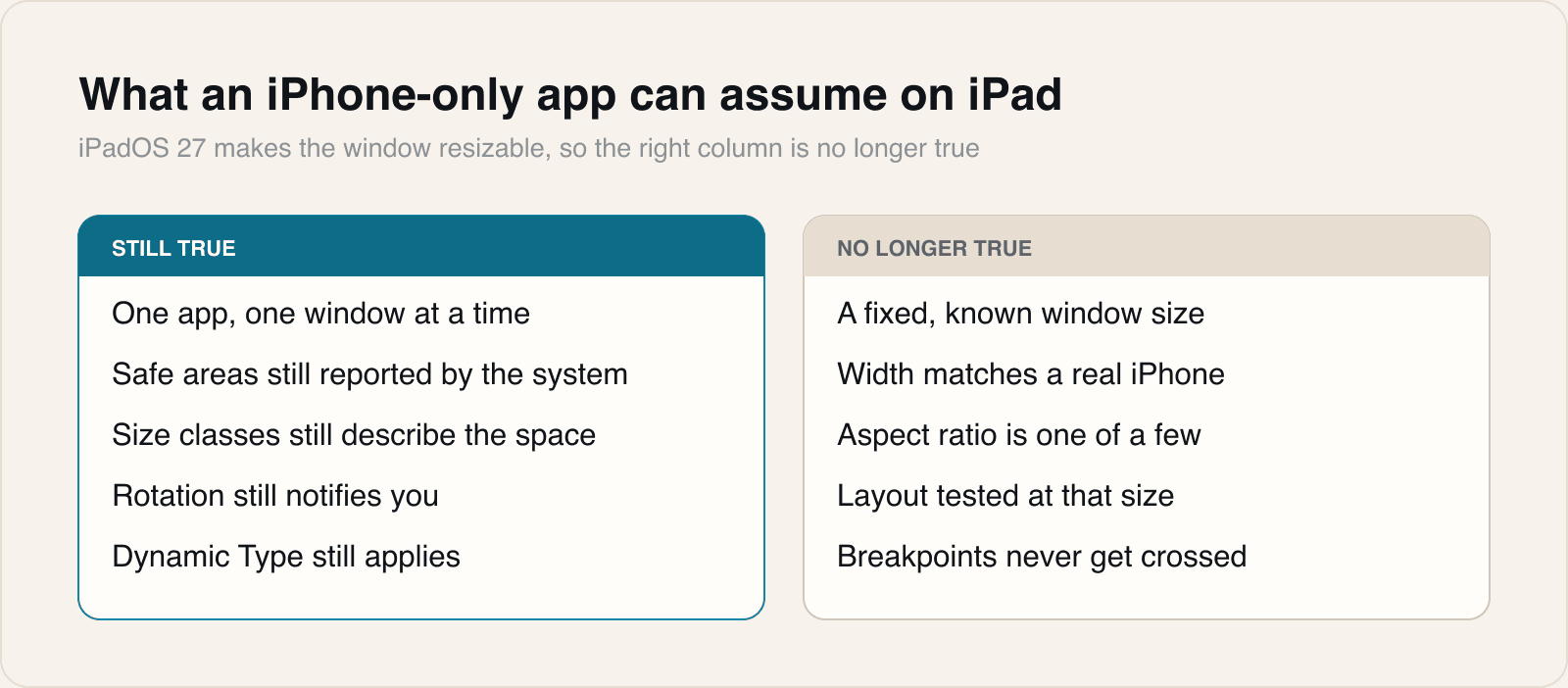
Resizable removes the right-hand column in one go. The window becomes a range rather than a value, and it changes while your code is running.
What actually breaks
The failures are not exotic. They are the shortcuts that were safe for as long as the window never moved.
- Hardcoded frame maths. Anything computed from a remembered screen width is now wrong at every other width.
- Layouts keyed to a device rather than to available space. A check for a particular model tells you nothing about the window you have been given.
- Images and headers sized to a fixed point value, which stretch or crop once the proportion changes.
- Modals and sheets positioned by absolute offset, which drift off screen at narrow widths.
- Keyboard avoidance tuned to one height, which either overlaps the field or leaves a gap.
The work is smaller than it sounds
Nothing here needs an iPad-specific build. The tools have existed for years and most apps already half-use them: size classes describe the space rather than the device, safe areas are still reported correctly, and rotation still notifies you. What changes is that these stop being edge cases and become the normal path.
- Resize the window through its whole range while the app is running, not just at launch. Layout bugs that only appear mid-session are the ones users hit.
- Test at the extremes rather than the middle. The narrowest and widest windows are where hardcoded values show.
- Do the same again at the largest Dynamic Type setting. Narrow plus large text is the combination that breaks rows.
- Delete device checks. If a branch asks what hardware it is on rather than how much room it has, it is already wrong.
A window is now a range, not a number.
The second tier worth noticing
The same notes describe a split inside Apple Intelligence itself. Siri AI needs an iPad mini with A17 Pro or an M1 and later, but the expressive voices and the generative image work need an M4 with at least 12GB of unified memory.
That is a support matrix inside a support matrix. A client hearing that their app can generate images on iPad is hearing something true of a narrow slice of recent hardware, not of iPads generally, and the gap between those two statements is where an awkward conversation lives.
What we tell clients
That this is a small piece of work now and an expensive one later. Resizable windows do not break an app loudly; they produce a layout that looks slightly wrong to a user who cannot say why, and that reaches you as a vague complaint rather than a bug report.
An afternoon spent dragging the window from its narrowest to its widest, at the largest text size, finds nearly all of it. That is a cheaper afternoon than the one spent reproducing a screenshot someone took on a device you do not own.
Sources
Reporting and images linked above belong to their respective publishers and are shown from their own servers. The analysis here is our own.