
A failed Face ID scan is freezing and rebooting some iPhone 18 Pro units
Some iPhone 18 Pro owners say the phone locks up and restarts after a failed Face ID attempt in a locked app. 9to5Mac has reproduced it on demand.
Some iPhone 18 Pro and iPhone 18 Pro Max owners report that their phone freezes and restarts after a failed Face ID attempt, days after the models reached customers on 18 September 2026.
9to5Mac says it reproduced the fault on at least one European iPhone 18 Pro, and published the steps. At a Face ID prompt, block the sensor so the first attempt fails, then tap the Try Face ID Again button on the alert that appears. On an affected phone the display stops responding to touch entirely, and after a few seconds the device panics and restarts to the lock screen. The trigger appears to be confined to unlocking content inside an app, such as the Passwords app or private Safari tabs, rather than the ordinary lock screen unlock.
The reported symptoms, and what remains open
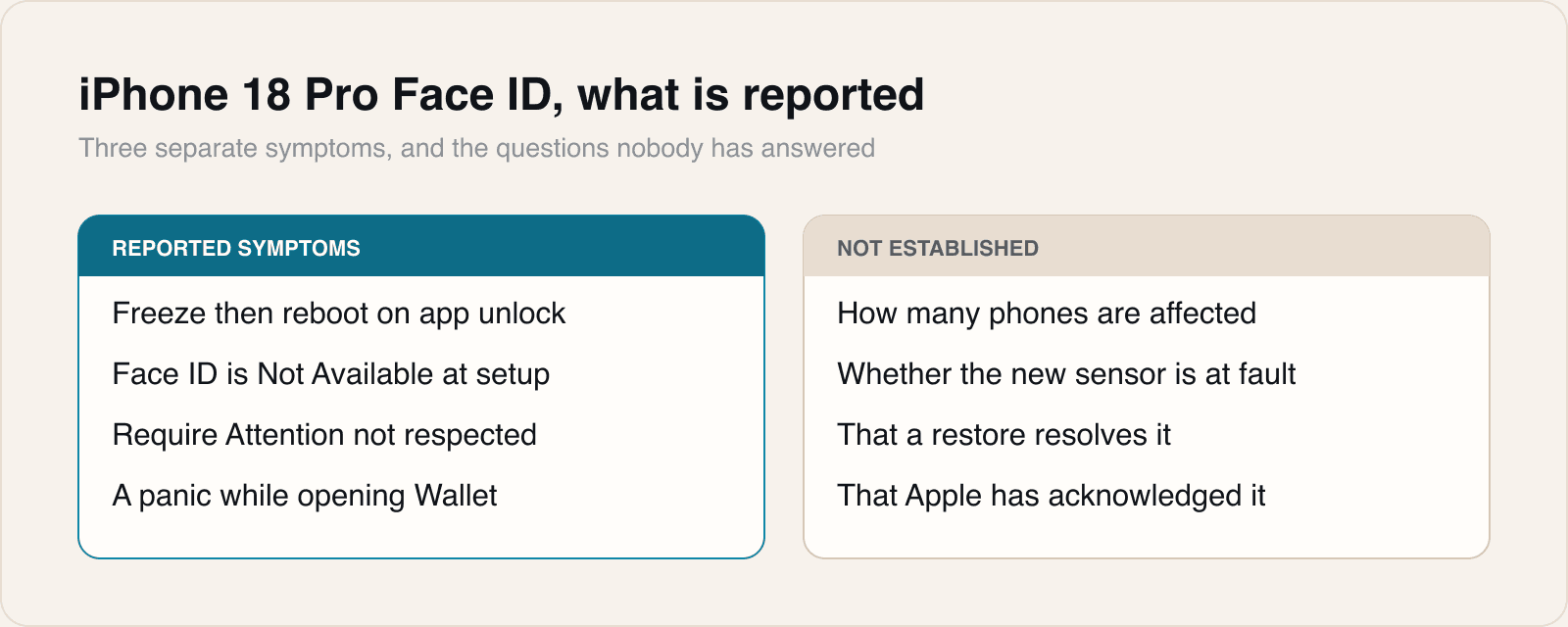
MacRumors describes two further complaints from its forum members that do not obviously share a cause with the reboot. Some owners report a Face ID is Not Available message when they try to set the feature up at all, and others say the devices do not consistently honour the Require Attention for Face ID setting when it is switched on. AppleInsider adds an individual account of an iPhone 18 Pro Max owner who logged four panic restarts on the first day, three of them apparently triggered by Face ID and one while Wallet was opening; the crashes stopped after Face ID was reset and then returned the following morning. Two other owners reported similar panics, including one whose restarts continued after a software restore.
The hardware context is that Apple moved Face ID's infrared camera underneath the top-left corner of the display on the iPhone 18 Pro models in order to shrink the Dynamic Island. Both MacRumors and 9to5Mac note the change and neither claims it is the cause. AppleInsider makes the point that the iPhone accounts lack the consistent diagnostic signature found in the Apple Watch reports circulating the same week, and treats the iPhone evidence as preliminary. Apple has not commented publicly; 9to5Mac says it has asked.
There is a disagreement in the reporting about what owners should do. One user told Reddit that Apple support recommended a hardware replacement, and AppleInsider describes a separate case where Apple Support ran diagnostics, judged the unit faulty and began arranging a swap. 9to5Mac takes the opposite view, calling a hardware diagnosis probably a misdiagnosis and expecting a software update to fix it. We think 9to5Mac has the better of it, and the reason is the reproduction.
Our take
A bug you can summon on demand, by following four written steps on a phone that was working a moment earlier, has the shape of software. Manufacturing defects do not wait politely for a specific button on a specific alert. The path involved is narrow and precise: not the first scan, but the retry after a failure, and only for an in-app authentication rather than a lock screen unlock. That is a distinct code path, exercised far less often during testing than the unlock everyone performs fifty times a day, and it is exactly where a bug survives a beta cycle.
That makes the replacement advice the part worth objecting to. Swapping a phone costs the owner an appointment, a restore and possibly several days, and if the fault is in iOS 27 the new handset arrives running the same build and doing the same thing. At least one reported case already fits that description, where restoring the software changed nothing. We would try the reproduction steps before accepting a swap, because a phone that reliably panics on a scripted retry is telling you something a diagnostic sweep will not.
We would also resist the tidy assumption that the under-display infrared camera is to blame. It is the most conspicuous change in this year's sensor array and therefore the most tempting culprit, but nothing published so far connects the two. A freeze followed by a panic on the retry path is equally consistent with a timing or state problem in how the authentication alert is handled, on hardware whose sensor happens to respond on a different schedule. The separate complaints about setup failing and Require Attention being ignored may well be three bugs rather than one, and bundling them is how a fix gets declared for symptoms that were never related.
For developers, the relevant detail is that the trigger surface is app-level biometric locking, which means apps that gate content behind authentication are where users will meet this. There is nothing to code around, since no process can catch a kernel panic, but there is something not to do: do not read a sudden rise in abandoned authentication attempts on new iPhones as evidence of a regression in your own integration. From inside the app, a device that restarted mid-prompt and a user who gave up look identical. Note the possibility, wait for the point release, and do not rewrite working code against a bug that is not yours.
Sources
 iPhone 18 Pro Face ID bug causing system to crash and reboot for some users9to5Mac, 2026-09-21
 Some iPhone 18 Pro Users Experiencing Face ID IssuesMacRumors, 2026-09-21
 Neural Engine timeouts & Face ID panics hit Apple's newest devicesAppleInsider, 2026-09-21
Reporting and images linked above belong to their respective publishers and are shown from their own servers. The analysis here is our own.