Impersonation Risk Detection in iOS 27 hands apps a scam risk level, in the United States only
Apple's new Impersonation Risk Detection lets an app ask iOS 27 whether the person using it is being scammed. It answers with one word, and it is off by default.
Apple has added a feature called Impersonation Risk Detection to iOS 27 and iPadOS 27, which were released on 14 September 2026.
It is aimed at a kind of fraud that existing protections do not touch. In a social engineering scam, the attacker does not break authentication; the account holder is talked into using it. Apple's support document describes the pattern as someone posing as a bank, a government agency or a trusted contact, pressuring the target into sending a payment or changing account details. Face ID works perfectly throughout, because the right person really is holding the phone.
The mechanism is a request an app makes at a specific moment. When a user takes an action Apple classifies as risky during a scam, such as making a payment or changing a password, a supporting app can ask the system for an assessment. iOS analyses signals on the device and returns one of three levels. Apple defines Unknown as no evidence of suspicious activity, Medium as some signs of it, and High as significant signs. Apple is explicit that Unknown is not a statement that the user is safe.
What the system looks at
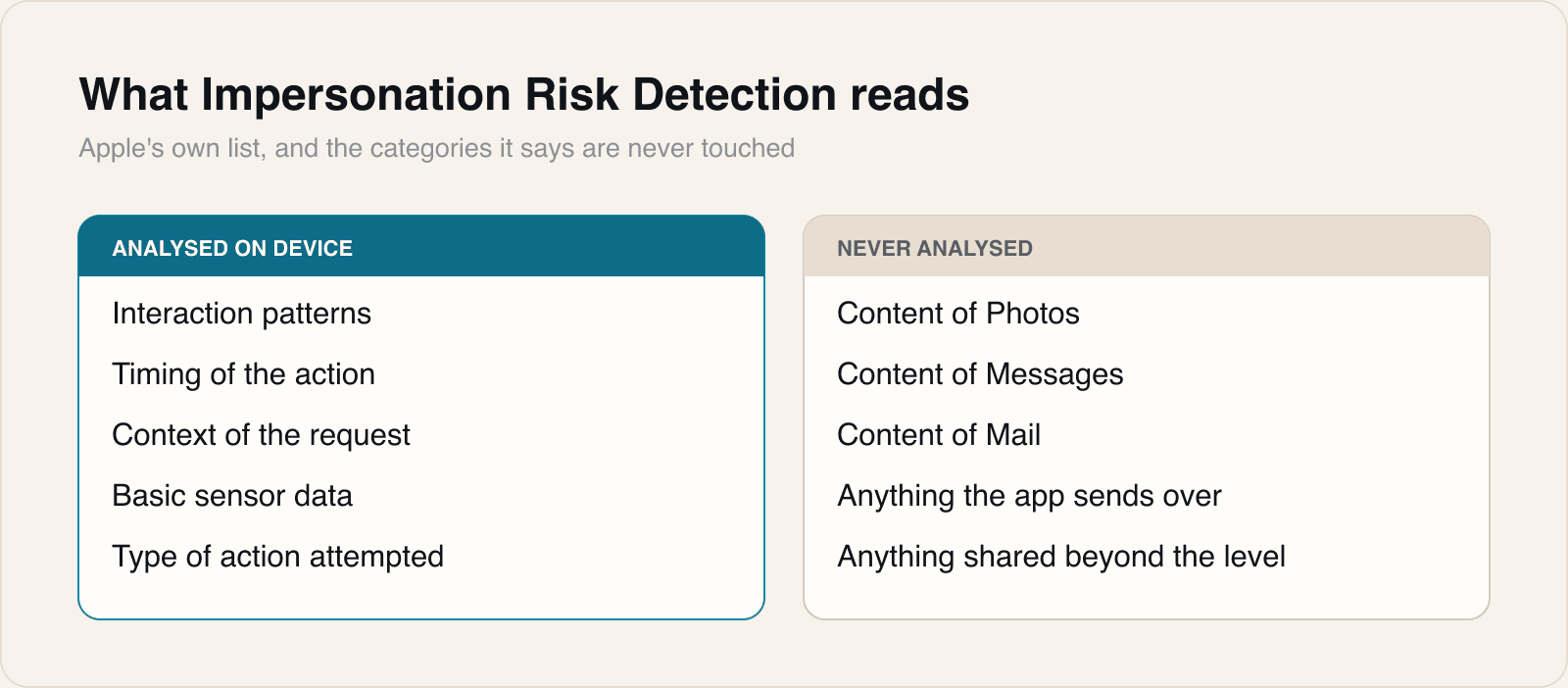
Apple lists what feeds the assessment as interaction patterns, timing, context and basic sensor data, and names the categories it does not read: the content of Photos, Messages or Mail. The app receives the risk level and nothing underneath it. Apple itself learns the type of action that prompted the request. The setting lives at Settings, then Privacy and Security, then Impersonation Risk Detection, behind a toggle labelled Share with App Developers, and Apple notes that changes to it can take up to 24 hours to take effect. The feature works only in third-party apps that have built support for it, and Apple's document lists availability in the United States.
What the system does not do is act. It does not block the transfer, halt the password change or raise an alert of its own. Apple states plainly that "Apple doesn't determine or control the action that the app takes". The app decides, and Apple's examples are asking the user to verify identity, adding a delay, or showing a warning. 9to5Mac, which found the feature off by default and several taps deep in Settings, reads the 24-hour delay as a deliberate guard against an attacker talking a victim into switching the protection off mid-call. Apple's own wording is neutral and describes changes in either direction, so that reading is a reasonable inference rather than a documented design goal, and we have not seen Apple confirm it.
Our take
This is the first time Apple has shipped something that treats the user's own authenticated actions as potentially coerced, and that is a genuinely new position for the platform. Every security control on an iPhone until now has been built to answer whether the right person is present. This one starts from the assumption that the right person is present and being manipulated, which is what actually happens in the scams that empty accounts. Getting a signal for that into the operating system, where the sensor and timing data live, is a better place to compute it than inside any individual banking app.
The delivery undermines it. A protection built for people in the middle of being deceived ships switched off, several taps into Settings, behind a label that reads like a data-sharing request. Anyone who goes hunting through Privacy and Security for a toggle named Share with App Developers is already the sort of person who does not get talked into wiring money to a safe account. The people the feature exists for will never find it, and the name actively discourages them, because it describes a plumbing detail rather than the benefit. Apple could keep every privacy property it has and still turn this on by default.
The second limit is that Apple has built a sensor and no actuator. Handing an app one word and declining to act means the protection is exactly as good as whatever the app does next, and Apple has said it will not standardise that. Two banking apps facing the same High assessment may behave completely differently, which makes the user's experience of the feature inconsistent and unadvertisable. Against that, it is the only design that could have shipped: an operating system that froze payments on a heuristic would be a support catastrophe the first time it was wrong.
For anyone building an app that moves money or changes credentials, the practical reading is that this is an opt-in signal you cannot assume is there. Assessments only arrive if the user has found the toggle, and Unknown is the answer you should expect nearly always, including on devices where the feature is switched off entirely. Treat Unknown as no information rather than as an all-clear, and make sure that the path a user takes when no assessment comes back is the one you have actually designed, not a fallback nobody tested. The United States limitation is worth noting too: if your app ships anywhere else, this does not exist yet, and Apple has not said when it will.
Sources
- About Impersonation Risk DetectionApple, 2026-09-14
- Use Impersonation Risk DetectionApple, 2026-09-14
 Security Bite: iOS 27 now lets apps ask your iPhone if you're being scammed9to5Mac, 2026-09-21
Reporting and images linked above belong to their respective publishers and are shown from their own servers. The analysis here is our own.