
Apple's Switch to Safari campaign takes on Chrome over trackers, distractions and battery life
Apple has launched a Switch to Safari page and two 15-second ads that pitch Safari against Chrome on tracking, distractions, speed and battery life.
Apple has launched a Switch to Safari campaign that compares its browser directly with Google Chrome.
The campaign, reported by 9to5Mac on 12 October, has two parts: a new page at apple.com/safari/switch and two 15-second video spots. The page names Chrome throughout. It says Chrome lets more third-party trackers follow you across the web, and that it does not remember which distractions you want kept hidden. 9to5Mac notes that Apple ran a Privacy on iPhone campaign in June that also pushed Safari over Chrome.
What do the ads show?
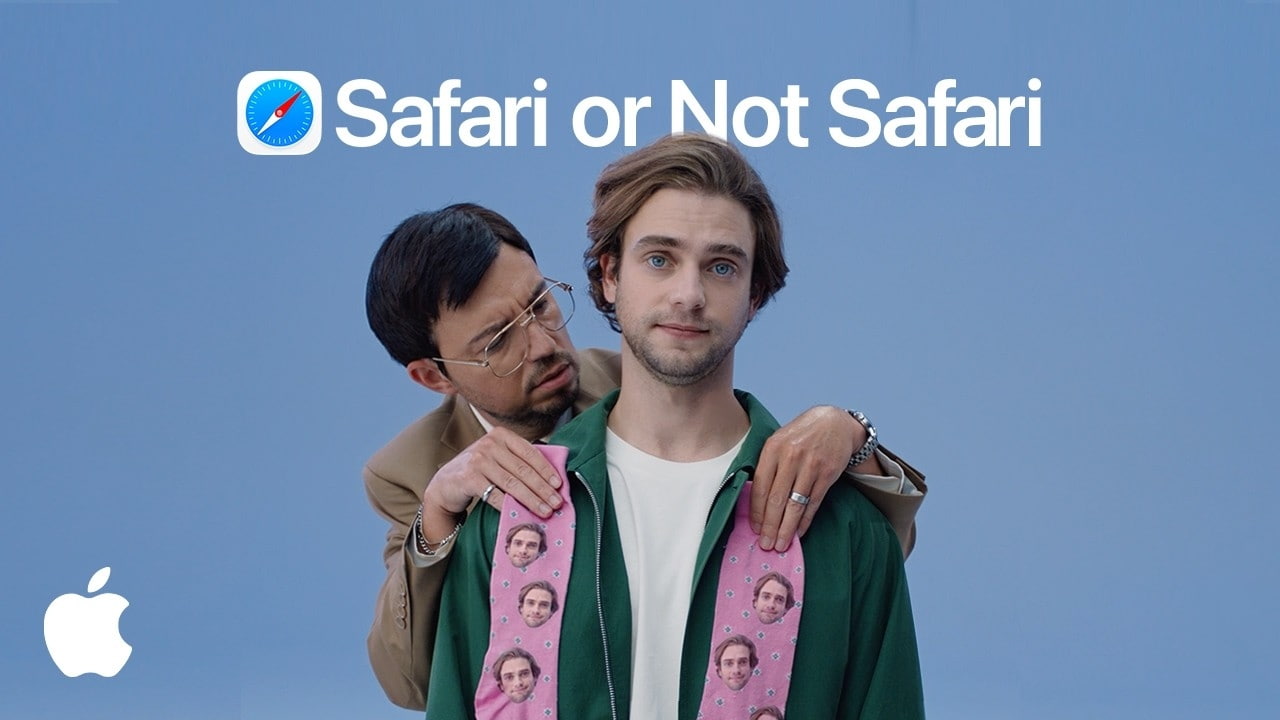
iClarified describes both spots. Each uses the same presenter, browsing first in a browser labelled Not Safari and then in Safari.
- Helps keep trackers away: a second man crowds the presenter with product suggestions drawn from his browsing, including socks printed with his face. Opening Safari removes him. The feature behind it is Intelligent Tracking Prevention.
- Helps keep distractions hidden: discount offers and email sign-up boxes float over the presenter's face. In Safari they dissolve into particles. The feature behind it is Distraction Control.
Neither outlet says whether the spots will run on television or only online.
How did Apple test its battery and speed claims?
The page's numbers come with footnotes, and the footnotes are narrower than the headlines. Apple says Safari gives up to five hours more video streaming on a Mac than Chrome, and loads frequently visited sites up to 35% faster. Both were tested by Apple in August 2026 on a 15-inch MacBook Air with an M5, 16GB of memory and a 512GB SSD, running a prerelease of macOS 27 and of Safari 27.0.
Claim | How Apple tested it |
|---|---|
Up to 5 hours more streaming | 1080p video on battery, brightness 8 clicks from bottom, against Chrome v151.0.7922.76 |
Up to 35% faster page loads | Snapshot versions of 12 popular sites under simulated network conditions, against Chrome v151.0.7922.138 |
Fastest browser | Average of JetStream 3.0, MotionMark 1.3.2 and Speedometer 3.1, against Chrome, Edge and Firefox |
The page also has a nine-row chart in which Chrome gets no ticks, from blocking third-party cookies by default to 4K HDR playback on a Mac, plus steps for making Safari the default browser on Mac, iPhone and iPad. No source we read included a response from Google.
Our take
The distraction ad promises more than the feature does. In the spot, pop-ups and offers dissolve the moment Safari opens. In Apple's own support article, Distraction Control is manual: you pick each item to hide, it works best on items that do not change, and it does not permanently hide ads or anything that updates often. Clearing your history also forgets every hidden item. It is a useful tool, but it is not the ad blocker the spot implies.
The tracking claim stands on firmer ground. Apple says Safari blocks third-party cookies by default, and on iOS 27 it now blocks The Trade Desk's ad domain and several ID firms by name. That is a concrete difference a viewer can check, which the battery figure is not: it is one MacBook Air, one video resolution and a prerelease of both systems.
APPDOOK's reading is that this is Apple answering Google on Google's own ground. Google promotes Chrome with banners on its own sites, and code in the iOS 27.2 beta showed Safari detecting those Chrome promotions and logging how people respond. An Apple page that names Chrome in almost every section is the open version of the same contest. The timing, a day before Apple's Welcome home launch, also suggests Apple wants Safari in front of new Mac buyers before they install anything else.
One footnote is worth reading before switching for the clever features. The page sells Notify Me and tab grouping, both Apple Intelligence features, and admits some have daily usage limits, as we found when Apple documented Notify Me. For privacy and battery life, the case for Safari on a Mac is real. For the AI tools, the limits are still Apple's to set.
Sources
 Switch to SafariApple, 2026-10-12
- Hide distracting items on webpages in SafariApple Support, 2026-06-15
 Apple's new 'Switch to Safari' campaign details why you should ditch Chrome9to5Mac, Chance Miller, 2026-10-12
 Apple Highlights Safari Privacy and Distraction Control in New AdsiClarified, Shalom Levytam, 2026-10-12
Reporting and images linked above belong to their respective publishers and are shown from their own servers. The analysis here is our own.