
A fake Zoom installer for Mac talks users past Gatekeeper to plant a backdoor, Jamf finds
Jamf Threat Labs found a fake Zoom disk image whose background art tells Mac users how to override Gatekeeper, then installs a backdoor it calls CloudSyncD.
Security researchers at Jamf have found a fake Zoom installer for the Mac that persuades its victim to switch off Gatekeeper's warning by hand, then installs a backdoor.
Jamf Threat Labs published its analysis on 30 September and calls the malware CloudSyncD, after the name its second stage runs under. Researcher Thijs Xhaflaire writes that the team found it while monitoring new files on VirusTotal, first in a development build on 15 September and then, within two days, in builds pointed at live servers on two different web domains. Jamf says neither domain was flagged by security vendors when it published.
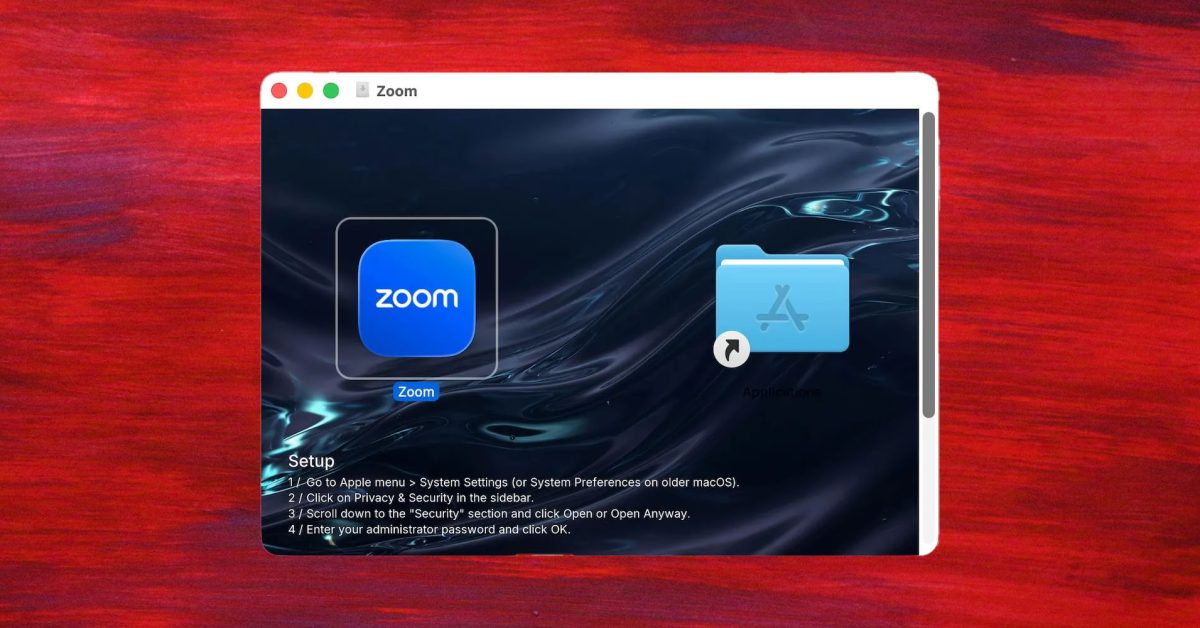
The disk image mounts as a volume called Zoom and looks like an ordinary Mac installer, with an app icon beside a shortcut to Applications. The background picture carries a numbered list of setup steps: open System Settings, go to Privacy and Security, scroll to the Security section, click Open Anyway, and enter an administrator password. The app is not signed by an identified developer, so macOS refuses to open it with a double-click. The steps in the picture are exactly how a user overrides that refusal. Apple told developers in August 2024 that macOS Sequoia would remove the old Control-click shortcut, leaving Privacy and Security as the place to allow software that is not correctly signed or notarised.
What does CloudSyncD do once it runs?
- It shows a fake password prompt and checks the answer against the Mac's own accounts, repeating until the password is correct.
- It shows a progress window reading Downloading Zoom, with no download behind it.
- It hides the password inside an innocent-looking settings file in the user's home folder, using invisible Unicode characters to mark where it is.
- It uses that password to launch its second stage with administrator rights.
- The second stage sends a survey of the Mac, including its hardware, user name and network address, then checks in every 8 to 16 seconds.
- On instruction from its server, it can download and run further programs.
Jamf is specific about what it did not see. The password is never sent anywhere. The malware has no built-in way to collect browser data, keychain items or crypto wallets. And in Jamf's sandbox it set up no launch agent, so it would not restart itself after a reboot.
That is different from 9to5Mac's account on 1 October, which says the malware installs the real Zoom alongside an infostealer that sends captured data every eight seconds. Jamf's analysis, the original source, says the opposite on each point: the Zoom download is fake, CloudSyncD is a backdoor rather than an infostealer, and the frequent check-ins carry only a hardware identifier. We follow Jamf. Jamf does not say how the disk image reaches victims.
How can you tell a Mac installer is fake?
The clearest sign is the one CloudSyncD depends on. A legitimate app from a known developer is signed and checked by Apple, and opens after one ordinary warning. If an installer's own artwork tells you to go into Privacy and Security and click Open Anyway, that is an instruction to turn off the protection, written by whoever made the file. Download Zoom from Zoom's own site, and treat any copy that arrives by link, ad or message as suspect. Anyone who has already run a Zoom disk image with those instructions should treat the Mac as compromised, since the second stage ran with administrator rights. Jamf's report lists files to look for, including a folder called cloudsync inside a hidden .local folder in the home directory.
Our take
CloudSyncD does not beat Gatekeeper. It asks the user to switch it off, politely and in numbered steps. That has become the common shape of attacks on Apple devices. Earlier today we reported a fake iPhone Duo pre-order page that loads the DarkSword exploit, another lure that borrows a trusted name to get a click. On the Mac, the weak point is increasingly one approval in Privacy and Security, the same panel where Full Disk Access quietly includes the Messages database.
Apple's move in Sequoia was meant to make overriding Gatekeeper deliberate. It did, and attackers responded by printing the instructions on the installer. APPDOOK's view is that the Open Anyway button now needs friction in proportion to what it unlocks: a plain warning that the app has not been checked by Apple, shown when the button is pressed rather than buried in a list. The rarer the legitimate need, the louder that warning can afford to be.
The part of Jamf's report that should worry people most is the quiet. CloudSyncD steals nothing by itself. It waits, reports in and runs whatever its operators send next, and Jamf found its servers carrying no security vendor detections. Infostealers announce themselves through stolen accounts. A backdoor like this is noticed only when its owners decide to use it.
Sources
 CloudSyncD: a two-stage macOS backdoor that hides a phished password in zero-width UnicodeJamf Threat Labs, Thijs Xhaflaire, 2026-09-30
 This fake Mac Zoom installer has a sneaky way to bypass Gatekeeper9to5Mac, 2026-10-01
 Updates to runtime protection in macOS SequoiaApple Developer, 2024-08-06
Reporting and images linked above belong to their respective publishers and are shown from their own servers. The analysis here is our own.