
iOS 27's Home app describes and searches HomeKit Secure Video clips, records in 4K, and merges related alerts into one
iOS 27 gives HomeKit Secure Video 4K, written clip descriptions and search, plus a Reduce Notifications switch. Here is what each needs and how to turn it on.
The Home app in iOS 27 adds four changes to HomeKit Secure Video and a setting that folds related alerts into a single notification, 9to5Mac set out on 8 October, five days before Apple's home product launch.
Apple announced the features at WWDC on 8 June, according to MacRumors, and they shipped with iOS 27 in September. HomeKit Secure Video is the iCloud+ service that records footage from compatible cameras, stores it encrypted in iCloud and lets the Home app run automations on what the cameras see. Three of the four camera changes use Apple Intelligence. The fourth, 4K, does not.
What changes for HomeKit Secure Video?
- 4K: supported cameras can now stream and record in 4K. HomeKit News notes the service had been capped at 1080p since it launched in 2019. MacRumors' iOS 27 guide says 4K does not need Apple Intelligence.
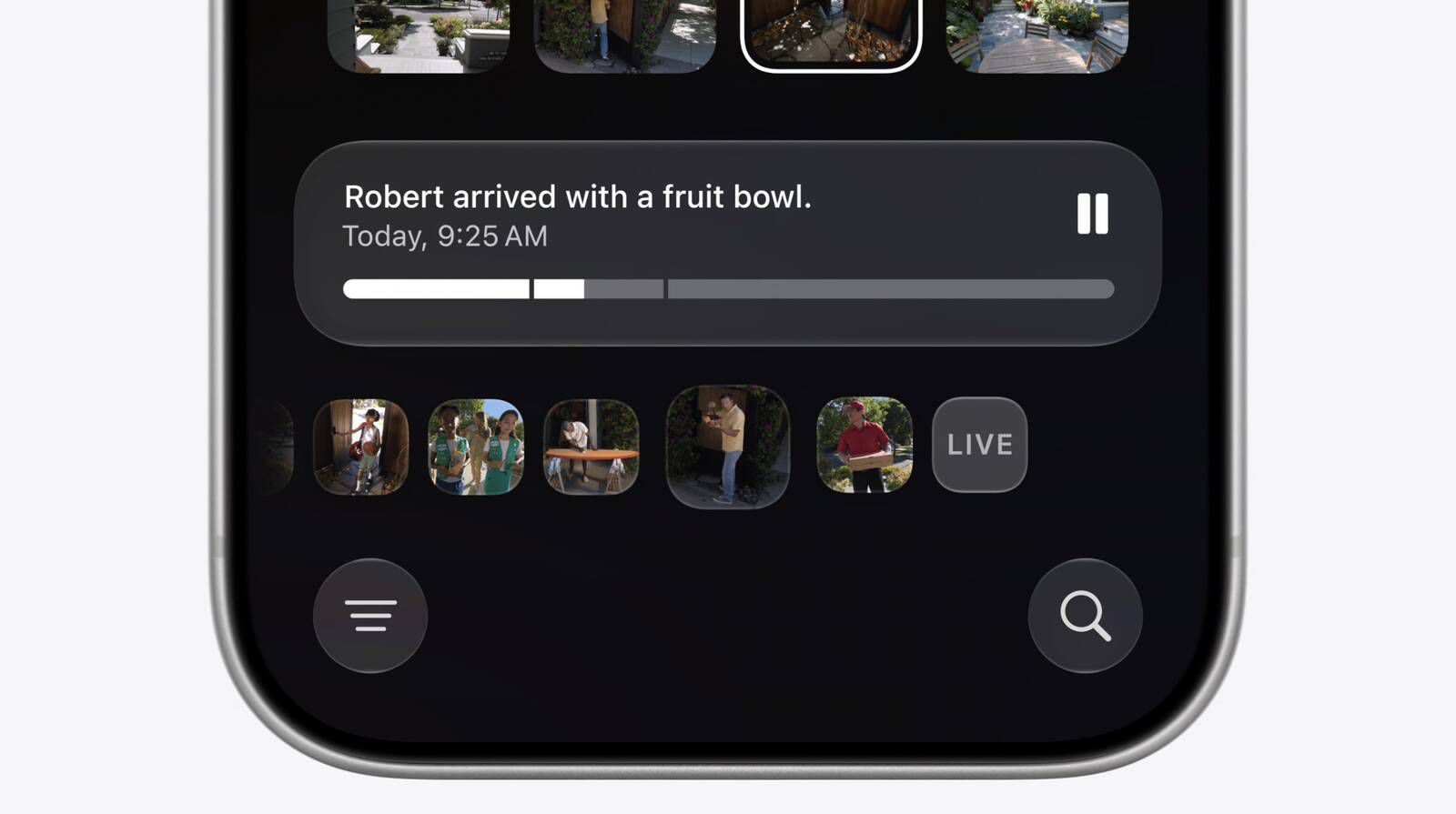
- Video descriptions: the Home app writes a short description of what happened across a run of clips, so you can follow events without watching them. MacRumors says the summaries pick out people, animals, vehicles and packages.
- Search: you can type what you are looking for, such as a parcel being delivered, and the app finds matching clips. MacRumors' guide says the search also works from Spotlight.
- Noteworthy clips: the top of the Search page now shows clips the app thinks you will want to review.
HomeKit News reports that Apple does some of this processing on the iPhone or iPad and some in the cloud, depending on the task. Apple has not published a list of cameras that support 4K, and HomeKit News says none was given.
What does Reduce Notifications do?
The second feature is a switch called Reduce Notifications. Its description in the app, as 9to5Mac shows it, says it combines related activities, such as someone arriving and unlocking the door, into one notification that updates in real time. In 9to5Mac's example, seven separate alerts become one that reads, in turn, that a person arrived, checked the mail and closed the garage door.
What do you need, and how do you turn it on?
The 4K change needs only a compatible camera. The Apple Intelligence features need more. Apple's macOS 27 beta 3 release notes, quoted by Michael Tsai, say Apple Intelligence for Home requires an iCloud+ subscription starting at 2TB. iThinkDiff and MacRumors list the rest: an iPhone 15 Pro or later, or an iPad that supports Apple Intelligence, and a home hub that is an Apple TV on tvOS 27 or a HomePod on HomePod Software 27. Macworld counts the combined notifications among the features behind the 2TB plan, and the switch sits in the same Apple Intelligence section of the settings.
iThinkDiff gives the steps:
- Open the Home app, tap the menu button at the top left and choose Home Settings.
- Scroll to the Apple Intelligence section, which shows how many of your cameras are eligible.
- Select a camera and turn on Video Summaries. Repeat for each camera, as there is no switch for all of them.
- Back in the Apple Intelligence section, turn on Reduce Notifications.
If the Apple Intelligence section is missing, iThinkDiff says the usual reason is a home hub that is offline or running older software.
Our take
4K is the change most owners will notice first, and it is the only one with no strings attached. Recording at 1080p for seven years made HomeKit Secure Video the safe choice rather than the sharp one, and the lack of a supported camera list means buyers still have to check each maker's own page before assuming a camera will step up.
The Apple Intelligence half is priced unusually. Ordinary HomeKit Secure Video still covers one camera on the 50GB plan and five on 200GB. The summaries are a different scale, and as Apple's own numbers for video summaries showed in September, the 2TB plan covers one camera, 6TB two and 12TB five. A household with three cameras is asked to pay for 12TB of storage it may never fill, purely to have its clips described. APPDOOK's reading is that Reduce Notifications is the more useful feature for most homes, and it is a pity it appears to sit behind the same plan.
For someone who already has HomeKit Secure Video cameras, the practical order is simple. Check whether the camera maker has a 4K firmware update, since that costs nothing. Then decide whether the summaries are worth the plan. A single camera on a 2TB plan you already pay for is an easy yes; anything more is a decision about money, not features.
The timing of 9to5Mac's reminder is not an accident. Bloomberg expects a home hub, a HomePod mini and an Apple TV on 13 October, and every one of them can act as the home hub these features depend on. Apple's own security camera is still reported for 2027, so for now the clips being searched come from other companies' cameras. What we do not know is whether a new hub will do more of the processing at home, which would be the obvious way to loosen the link to iCloud storage.
Sources
 Apple Home adds two powerful new features in iOS 279to5Mac, Ryan Christoffel, 2026-10-08
 Apple to Add AI Video Descriptions and Smarter Notifications to Home AppMacRumors, 2026-06-08
 Apple Intelligence and 4K recording come to the Home appHomeKit News, 2026-06-09
 Some Apple Intelligence for Home features require a 2TB iCloud subscriptionMacworld, 2026-07-07
- Apple Intelligence for Home's iCloud+ RequirementsMichael Tsai, 2026-07-08
 iOS 27 Home App: 10+ New HomeKit FeaturesMacRumors, 2026-08-06
 How to Enable Apple Intelligence Video Summaries in the Home AppiThinkDiff, 2026-09-15
Reporting and images linked above belong to their respective publishers and are shown from their own servers. The analysis here is our own.