The iPhone Duo hinge angle is available to apps, and Apple's guidance is not to build your layout on it
Craig Federighi described the iPhone Duo's hinge angle API this week. Apple's own developer session tells apps to use it for effects, not for layout.
Craig Federighi described how apps can read the iPhone Duo's hinge in an interview published on 29 September, weeks before the foldable reaches buyers.
Speaking to the YouTube channel Donald Decodes, in an interview reported by 9to5Mac, Apple's software engineering lead said the system reports the hinge angle to an accuracy of around five degrees, and exposes the device's pose, the named positions a folding phone can be held in. He placed it in a line of precedent, noting Apple's long history of exposing gyroscope and accelerometer data, and said UIKit and SwiftUI abstract away many of the harder layout problems so that frameworks can react without each app solving them again.
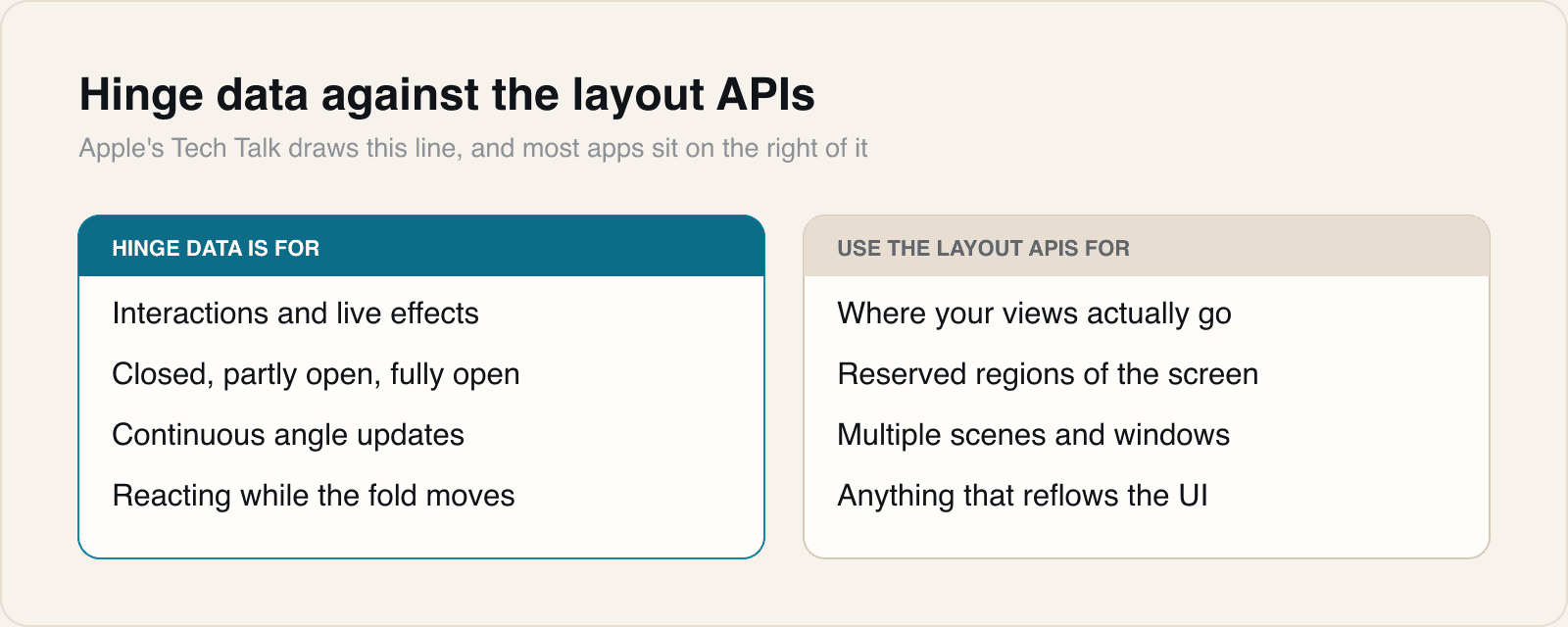
Apple's own developer session is more specific, and in one respect it points the other way. The Tech Talk on multiple displays and scenes gives the API names: an onHingeChange modifier in SwiftUI and a UIHingeInteraction in UIKit. Both report a high-level status of closed, partially open or fully open, along with continuous updates of the hinge angle, delivered as an Angle value in SwiftUI. The session then draws a line that Federighi's framing does not: hinge data is observed live and is suited to driving interactions or effects, and for layout an app should use the arrangement and region APIs instead. The hinge value is absent on hardware that has no hinge, which is every other iPhone, so an app is expected to check before reading it.
The same session sets out two constraints that have nothing to do with the angle. iPhone Duo is the first iPhone to support multiple instances of an app's interface, and on the outer display new windows cannot be created, a behaviour reserved for the inner display. Apple tells developers to handle the error when a request for a new scene fails. A separate camera capture accessory is available only when an app is full screen on the inner display with an active camera session.
Hinge data against the layout APIs
What it means
Two messages went out this week and they are not quite the same message. An executive describes a phone that knows how far it is open and frameworks that react on your behalf. The documentation says the angle is for effects and tells you to lay out with something else. The documentation is right, and the gap between the two is where a lot of first-generation foldable apps will go wrong.
The reason is in the word continuous. A hinge angle is not an event, it is a stream, and a value that updates while a person's hand moves is a poor thing to make your view hierarchy depend on. An app that switches layout at some angle threshold will switch it repeatedly while someone adjusts their grip, and every switch costs a re-layout, a lost scroll position and possibly a lost keyboard. The arrangement and region APIs exist because the question an app actually needs answered is not how far open the device is but which rectangles are safe to draw in, and that answer changes far less often than the angle does. Apple naming pitch bend as an example of good use is a tell: the right uses are the ones where a jittery value produces a pleasant result rather than a broken one.
For most apps, then, the honest summary of the hinge API is that it is not for you. The features on the other side of the line are the ones with consequences. Multiple scenes on an iPhone is the genuinely new capability here, and the outer-display restriction is the detail we would flag hardest: an app that opens a second window in response to a tap works on the inner screen and fails on the outer one. That is not a rare edge. It is a user tapping the same control on the same phone held a different way, and if the failure is unhandled it presents as a button that does nothing. Apple's instruction to handle the error is the single most actionable sentence in the session.
The nil check deserves the same attention for a duller reason. This API ships inside an SDK that every iPhone app builds against, and the overwhelming majority of devices running that app have no hinge at all. Reading hinge state without checking is a crash or a wrong branch on hundreds of millions of phones to serve one. That inversion, a new capability that is absent on almost all the hardware, is the normal condition of Apple SDK adoption and it is still the thing teams forget in the first fortnight.
One claim we would keep attributed rather than repeat as fact. The five degree figure is Federighi's, given in an interview, and we could not find it in Apple's developer documentation, which describes the angle without stating its precision. That is a meaningful omission rather than a trivial one: an app driving a visual effect from the angle needs to know how much of the wobble it sees is the person's hand and how much is the sensor. Until Apple publishes a figure, treat five degrees as a well-informed description and smooth the input yourself.
Federighi also mentioned agentic coding tools adapting apps automatically, and that is the part we would not plan around. A tool can resize a view and satisfy a layout constraint. Deciding what your app should become when someone opens it like a book is a product question, and the apps that make the Duo look worth owning will be the ones where a person answered it.
Sources
 Leverage multiple displays and scenes on iPhone DuoApple Developer, 2026-09-22
 Craig Federighi on how Apple helps developers make the most of the iPhone Duo9to5Mac, 2026-09-29
Reporting and images linked above belong to their respective publishers and are shown from their own servers. The analysis here is our own.