
Apple has put premium features in Pages, Keynote and Numbers behind a Creator Studio subscription
Apple updated Pages, Keynote, Numbers, Freeform and Pixelmator Pro on 29 September, and placed several of the new features behind Creator Studio.
Apple updated Pages, Keynote, Numbers, Freeform and Pixelmator Pro on 29 September, and put several of the new features behind its Creator Studio subscription.
The announcement came as a single Apple Newsroom post covering the whole suite. In Keynote, Apple added new themes and what it calls intelligent slide generation, which the company says now automatically creates images tailored to a presentation. Pages gained a Screen View mode on Mac, described as optimising content for reading and focused writing, along with new templates. Numbers received new trigonometry, statistics and logic functions. All three apps gained an access request feature, so someone opening a shared file can ask the owner for permission rather than waiting to be invited, and 9to5Mac reports that all three can now answer Siri questions about the contents of an open document.
Pixelmator Pro gained two template collections, one aimed at sports and action projects and one at launching a new product or business, plus a Podcasts category sized for cover artwork. Its Select and Mask tools, previously limited to the Mac, arrived on iPad. Freeform gained folders for organising boards, a dark mode that adapts automatically, and Writing Tools support that will rewrite, proofread and summarise handwritten notes. On visionOS 27, Freeform can pull several items at once into the space around the user, including images, videos and 3D models.
Which of the new features cost money?
Apple's Newsroom post does not say. It lists the additions app by app and draws no line between the ones anybody gets and the ones that require a subscription. That line is on Apple's own Creator Studio product page, which states that Keynote, Pages, Numbers and Freeform remain available without a subscription, while premium templates, a library of royalty-free photos and graphics, and what Apple calls powerful intelligence features are part of the paid tier. MacRumors made the same point in its write-up, describing Creator Studio as unlocking premium features in apps that are otherwise free.
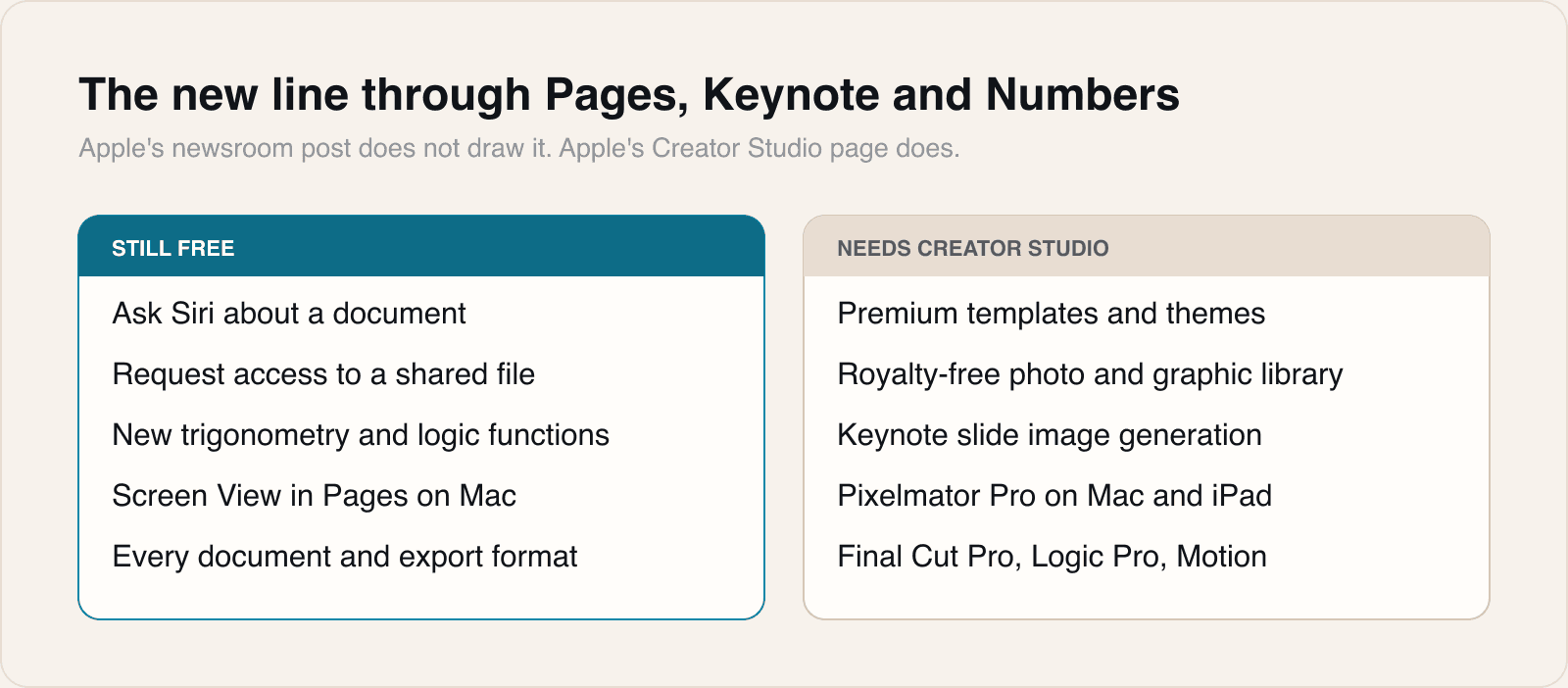
Apple Creator Studio costs 12.99 dollars a month or 129 dollars a year, with one month free for new subscribers. Verified students and educators pay 2.99 dollars a month or 29.99 dollars a year. Buying an iPad or a Mac brings three months free, one offer per Apple Account, claimable within three months of activating the device. The subscription covers Final Cut Pro, Logic Pro, Pixelmator Pro, Motion, Compressor and MainStage outright, and the premium layer inside Keynote, Pages, Numbers and Freeform.
Apple published no version numbers for any of the updated apps, no regional availability detail, and no minimum operating system for the new features. The Creator Studio page lists requirements for the paid applications rather than for the updated free ones.
Our take
The iWork apps have been free with a new Apple device since 2013 and free outright since 2017, and free has meant the same thing throughout: you got the app, all of it. That is no longer the description. Pages, Keynote and Numbers are now free applications with a paid tier inside them, and the change arrived without a sentence in the announcement acknowledging it.
Where Apple drew the line is more interesting than the fact of drawing one. Nothing structural moved behind the paywall. Every file format, every export, every collaboration feature and the whole of the new access request flow stays free, and so does Siri answering questions about an open document, which is the kind of thing a company keen to monetise AI would have been tempted to charge for. What went to the paid side is decoration and generation: templates, themes, a stock library, and Keynote making images for you. APPDOOK reads that as a deliberate and reasonably honourable split, because it means nobody will ever open a document and find they cannot edit it. The cost of not subscribing is that your deck looks plainer, not that it fails to open.
The one we would watch is Keynote's slide generation. Apple Intelligence has so far been a free capability of the hardware, its limits set by which chip you own rather than by what you pay each month. This is the first time a headline Apple generative feature sits behind a recurring charge in an app most people already have, and it is worth being clear that the boundary has moved even though Apple did not frame it that way.
Two things the sources do not settle, and both matter to anyone deciding whether to pay. Nobody has said what happens to a document built on a premium template once a subscription lapses: whether it renders as designed, degrades, or simply cannot be edited. And nobody has said whether a colleague without a subscription sees your premium theme correctly when you share the file. For a format whose whole point is that it travels, that is not a small gap, and we would want it answered before standardising a team on anything in the paid column.
For anyone shipping software, the mechanic on display is a familiar one executed unusually cleanly. A free application with a subscription that unlocks content rather than capability avoids the trap most freemium products fall into, which is that the free tier has to be deliberately frustrating for the paid tier to sell. Apple has made the free version genuinely complete and is charging for the things that are nice to have, and the reason that works is that templates and stock art cost real money to produce every year. If your own paywall is gating a feature you have already built and will never touch again, you are charging a subscription for a one-off, and users work that out faster than anyone expects.
Sources
 New updates coming to Apple Creator StudioApple Newsroom, 2026-09-29
 Apple Creator StudioApple, 2026-09-29
 Pages, Keynote, Numbers, and Pixelmator Pro just got new features9to5Mac, 2026-09-29
 Apple Creator Studio and Final Cut Camera Get New FeaturesMacRumors, 2026-09-29
Reporting and images linked above belong to their respective publishers and are shown from their own servers. The analysis here is our own.