
How to prepare a Mac fleet for Rosetta's removal in macOS 27, before Intel apps stop working in macOS 28
macOS 27 does not restore Rosetta after the upgrade, and macOS 28 ends it for all but old games. How IT teams find Intel apps, reinstall Rosetta and plan.
Upgrading a Mac with Apple silicon to macOS 27 leaves it without Rosetta, the layer that lets Intel-only apps run, until someone installs it again.
Apple's macOS 27 release notes, as quoted by developer Blake Crosley, say that if Rosetta was previously installed it is not automatically restored after the upgrade. Rosetta still works on macOS 27 once it is back: Apple's support article on Intel-based apps, published on 21 September, says it is available for any Apple silicon Mac running macOS 27 or earlier. From macOS 28, the same article says, Rosetta will work only for certain older, unmaintained games that rely on Intel-based frameworks, and Intel apps and some of their components will stop working.
On 17 October Bradley Chambers, who manages Macs for an organisation and writes 9to5Mac's Apple @ Work column, described how he is handling it. When someone opens an ordinary Intel app after the upgrade, macOS asks them to reinstall Rosetta. Menu bar utilities from vendors without native builds were a different story in his testing over the summer: they failed silently, with no prompt at all.
The warnings started earlier. Since macOS Tahoe 26.4, MacRumors reported in February, opening an app that runs under Rosetta brings up a notice that it will stop working when Rosetta support ends.
How do you find which apps still need Rosetta?
Apple gives two ways to check a single Mac. In macOS 27, open System Settings, choose General, then About, and click Details next to Intel-based Apps for a list. In Finder, select an app, choose File then Get Info, and look at Kind: Application (Intel) means it needs Rosetta, Application (Universal) means it runs natively.
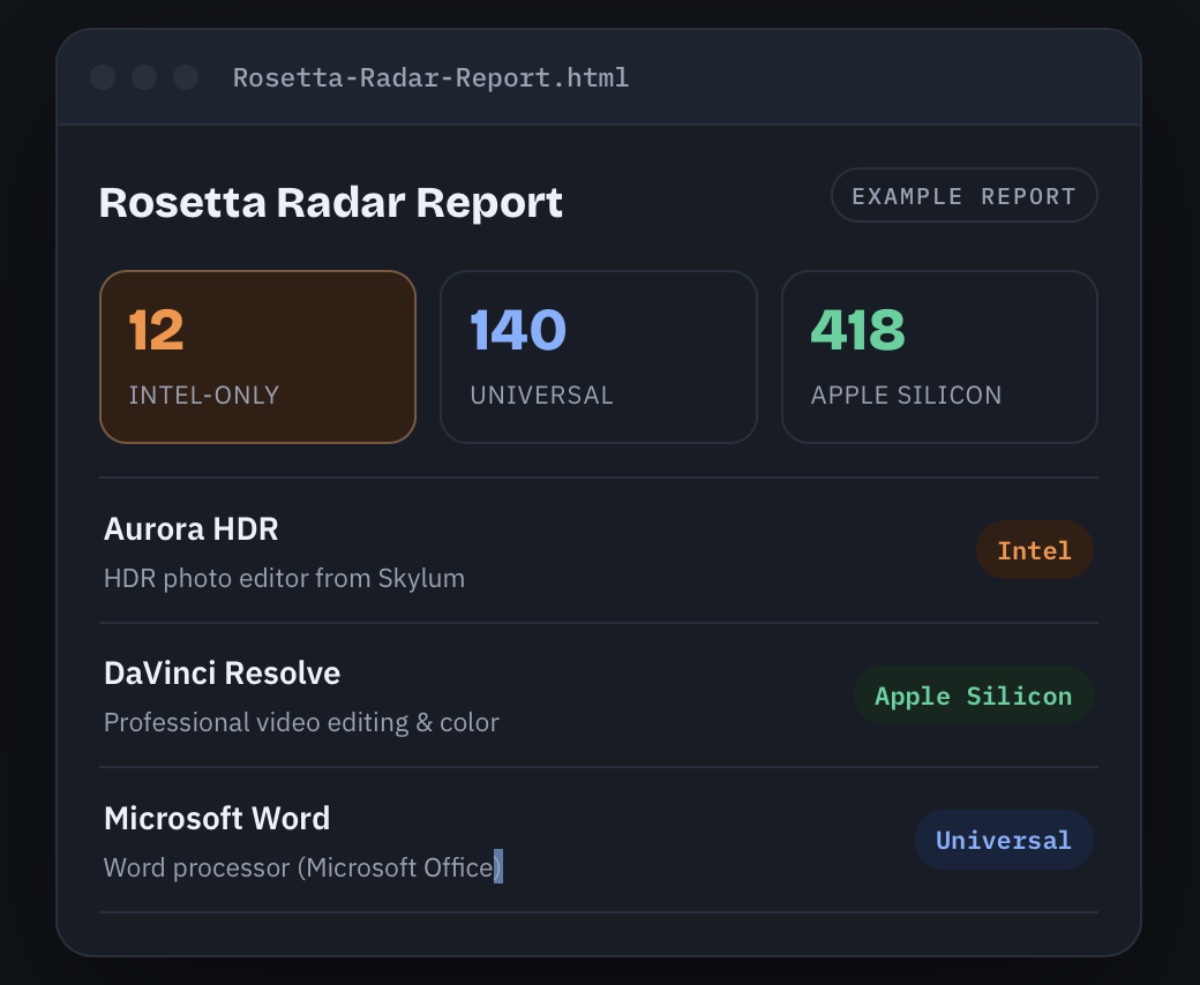
Across a fleet, the same information is in System Information's Applications list, which shows each app's kind, and in the app inventory most device management services collect. Ast-Ware Arts' free Rosetta Radar, which MacTech covered in September, scans one Mac, sorts apps into Intel-only, Universal and Apple silicon, and saves a CSV file to the desktop that can be collected and merged.
When the list comes back, look past the Applications folder:
- Menu bar utilities, login items and background helpers, the software Chambers saw fail without a prompt.
- Plug-ins, drivers and audio units loaded by native apps, which may not show up as apps at all.
- Your own installer packages. Apple's release notes say a package that names no host architecture now defaults to arm64, so pre and post install scripts need testing on macOS 27.
- Apps someone set to Open using Rosetta. The release notes say these now launch natively after the upgrade, which is usually fine and occasionally is why the setting was there.
How to reinstall Rosetta on every Mac that upgrades
Apple's support article gives one command, run in Terminal: softwareupdate --install-rosetta. For an unattended script, Chambers adds --agree-to-license so the licence prompt does not stop it. In Mosyle, which sponsors his column, he creates a script profile with that command and assigns it to a dynamic device group that collects every Mac running macOS 27. Any management service that can run a script on a group of devices can do the same.
He describes it as a short-term workaround, and it is. It buys the time until macOS 28, nothing more.
What to tell software vendors
Chambers' point to vendors is blunt: Apple silicon Macs have shipped since late 2020, so a native build still on the roadmap is a choice about priorities. Ask each vendor on the Intel list for a date, in writing, and set it against your own macOS 28 testing window rather than Apple's release day. He notes that many organisations hold a new macOS for around 90 days of testing.
Our take
Apple has built a careful sequence of warnings for this: the notice in macOS 26.4, the Intel-based Apps list in About, the reinstall prompt after the upgrade. Every one of them is designed for a person opening an app on purpose. The software that fails silently is the software nobody opens, which is exactly where a fleet is most exposed. A missing menu bar icon does not look like an error to the person at the desk. It looks like the Mac is broken, and it reaches IT as a vague help desk ticket rather than a clear cause.
There is a second design problem in the prompt itself. It asks for a macOS user name and password, and on a managed Mac where staff are not administrators that may be a request the user cannot complete. Pushing the install by script removes that dead end, which is why APPDOOK thinks the script is right for most organisations this year.
It also removes the one signal Apple built in. The reinstall prompt is the moment a user discovers that an app is living on borrowed time; script it away and nobody sees it. So run the inventory first and keep it, and consider letting a small test group upgrade without the script, so that whatever breaks there breaks in front of IT and not in front of everyone. That is cheaper than meeting the same failures in macOS 28, when there is no command to bring Rosetta back.
macOS 27 has form for this kind of quiet removal. Its end of Time Machine backups to AirPort Time Capsule also had to be handled before the upgrade rather than after, and its Apple Intelligence controls for organisations work feature by feature through MDM, which is the same tool doing the Rosetta work here.
The games exception will not save business software. Apple has not published which titles it covers, only that they are older and unmaintained, and even large games are moving: The Elder Scrolls Online is due to run natively on Apple silicon in summer 2027. If Apple keeps to its usual autumn schedule, macOS 28 arrives about a year from now. A vendor without a native build by then is a vendor to replace, and the inventory made this month is the list to start from.
Sources
 Apple @ Work: How I'm preparing my fleet for Rosetta's removal in macOS 279to5Mac, Bradley Chambers, 2026-10-17
- Using Intel-based apps on a Mac with Apple siliconApple Support, 2026-09-21
 macOS 27 Golden Gate Release NotesApple Developer, 2026-09-14
- macOS 27 Golden Gate Is Out: What Changes for DevelopersBlake Crosley, Blake Crosley, 2026-10-02
 macOS Tahoe 26.4 Displays Warnings for Apps That Won't Work After Rosetta 2 Support EndsMacRumors, Juli Clover, 2026-02-16
 Ast-Ware Arts Launches Rosetta Radar, a Free Mac Utility That Finds the Apps That Will Stop WorkingMacTech, Dennis Sellers, 2026-09-24
Reporting and images linked above belong to their respective publishers and are shown from their own servers. The analysis here is our own.
How we report: editorial policy. Spotted an error? Report a correction.
Newsletter
Apple news, in your inbox
Get APPDOOK's Apple news by email, checked against the source like everything here.
Follow APPDOOK
New Apple stories every day, checked against Apple’s own sources.