
iOS 27's extra-large widgets: the 4x6 Home Screen size, the 11 Apple apps that use it, and how to add one
iOS 27 brings an extra-large 4x6 widget to the iPhone Home Screen. Here is which Apple apps offer it, how to add one, and what app makers need to ship it.
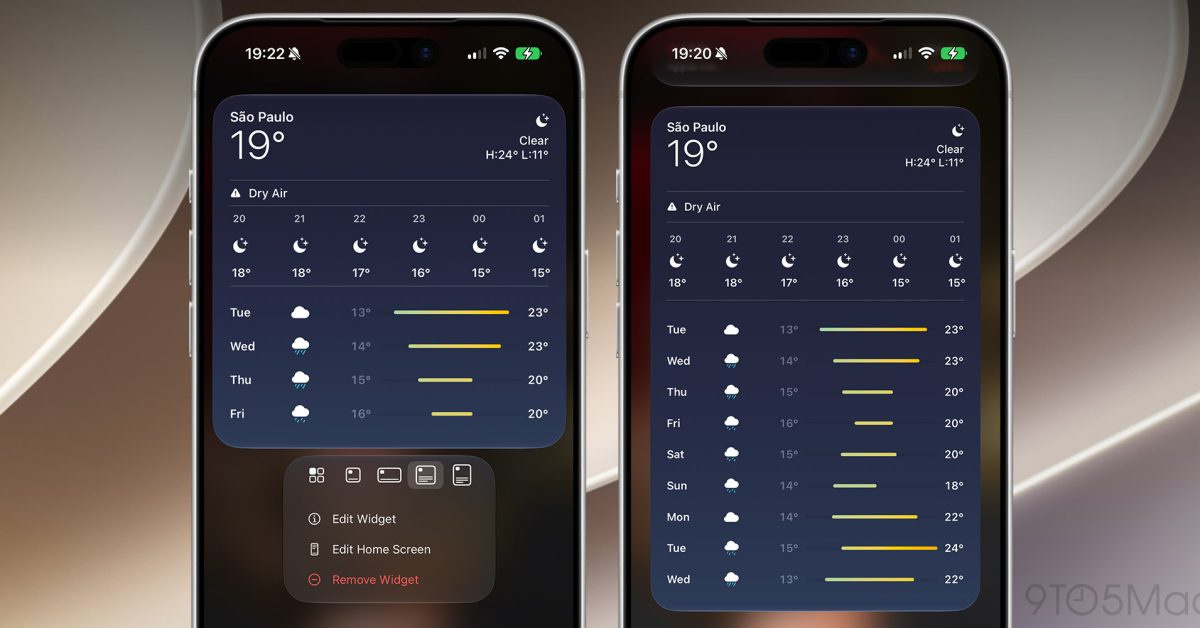
iOS 27 lets iPhone owners place an extra-large widget on the Home Screen for the first time, a size that fills most of a page.
The new size is four columns wide and six rows tall in app icon terms. Until iOS 27 the largest widget on an iPhone was large, at 4x4, while small is 2x2 and medium 4x2, as 9to5Mac set out when Apple announced the release on 8 June. Extra-large widgets also work in Today View, the column of widgets to the left of the first Home Screen page. The feature shipped with iOS 27 in September and runs on any iPhone that runs iOS 27, not only the largest models.
Apple's own developer documentation confirms the change. WidgetKit has offered an extra-large family on iPad and Mac since iPadOS 15, and its documentation still says that family is for iPadOS and macOS. What is new is a second one, systemExtraLargePortrait, which Apple lists as introduced in iOS 27.0 and which it says can appear on the Home Screen on iOS.
Which apps have an extra-large widget?
Only Apple's own apps, for now. 9to5Mac counts 17 extra-large widgets across 11 built-in apps in its 14 October round-up, though its introduction says 15 or more, so treat the exact number as 9to5Mac's tally rather than Apple's. We found no Apple page that lists them.
App | Extra-large widgets |
|---|---|
Calendar | List, Up Next |
Home | Accessories |
Music | Recently Played, Recommendations, Top Charts |
News | Today, Topic |
Notes | Folder, Quick Note |
Photos | Album, Featured |
Reminders | List |
Shortcuts | Shortcuts |
Stocks | Watchlist |
TV | Continue Watching |
Weather | Forecast |
Calendar's List widget can show reminders alongside events, which 9to5Mac's Ryan Christoffel described in August as covering most of the coming week.
How do you add one?
- Touch and hold an empty part of the Home Screen until the icons jiggle, then tap the add button.
- Pick one of the apps above and choose its extra-large widget, or place a smaller widget from the same app.
- To change size later, drag the handle at the bottom-right corner of the widget. Dragging it out expands the widget to extra-large where the app offers that size; dragging it in shrinks it back.
If a widget will not stretch to the full page, the app does not offer the extra-large size yet.
Our take
A widget the size of a page only really makes sense on a bigger screen, and the timing points that way. The iPhone Duo ships on 23 October on iOS 27.1, and 9to5Mac expects the size was made with its large inner display in mind. On a 6.1-inch iPhone, by contrast, a 4x6 widget is very nearly the whole page. On a regular iPhone the best use is probably a page you swipe to for one job: Calendar's List as a week view, or Home's Accessories as a control panel.
It is also part of a wider pattern this year. iOS 27 already brought widgets to the CarPlay dashboard, and Apple's developer agreement now has terms for iPhone widgets that appear on HomeView. A widget is becoming the main way an app shows up outside itself, which raises the stakes for getting one right.
For app makers the documentation holds a detail that is easy to miss, and it is the one APPDOOK would flag to any team that already ships an iPad widget. As Apple's documentation reads, the extra-large family an iPad app supports today is not the one the iPhone uses: on iOS 27 the iPhone Home Screen takes systemExtraLargePortrait, so a widget extension has to add that family to its supported families and design a tall layout for it. An app that already has a wide iPad widget does not get the iPhone size for free. Apple has not published guidance on what belongs in the extra space, and none of the 11 apps above comes from a third party.
What is still unknown: whether Apple will open the size in more of its own apps in iOS 27.1, which apps outside Apple's adopt it first, and whether a 4x6 widget redraws sensibly when the iPhone Duo folds. We will report the first third-party apps to ship one.
Sources
 WidgetFamily.systemExtraLargePortraitApple Developer Documentation, 2026-10-15
- WidgetFamily.systemExtraLargeApple Developer Documentation, 2026-10-15
 iOS 27 adds brand new widgets for your iPhone's Home Screen9to5Mac, Ryan Christoffel, 2026-10-14
 iOS 27 adds extra-large widgets for your extra-large needs9to5Mac, Marcus Mendes, 2026-06-08
 iOS 27 gives Apple Calendar my favorite new Home Screen upgrade9to5Mac, Ryan Christoffel, 2026-08-12
- iOS 27 Extra-Large Widgets: New 4x6 Home Screen Size ExplainedAll Things How, 2026-06-09
Reporting and images linked above belong to their respective publishers and are shown from their own servers. The analysis here is our own.
How we report: editorial policy. Spotted an error? Report a correction.
Newsletter
Apple news, in your inbox
Get APPDOOK's Apple news by email, checked against the source like everything here.
Follow APPDOOK
New Apple stories every day, checked against Apple’s own sources.